

Application Brief
This is an Application Brief and does not contain a detailed Experimental section.
Lisa Towers, Mark Towers, Emmanuelle Claude, Joanne Ballantyne
Waters Corporation, Wilmslow, United Kingdom
Published on May 11, 2026
This is an Application Brief and does not contain a detailed Experimental section.
This application brief demonstrates the applicability and usability of the MSI Analyte Browser MicroApp. After a user has processed their data in High Definition™ Imaging (HDI™) Software, this tool enables quick and easy putative identification of analytes, searching against any publicly available or in-house curated databases.
Historically, once data has been processed from either DESI or MALDI imaging applications, obtaining a putative identification for any analytes of interest has required either manual searching on websites or export to a third-party identification software. This requires lengthy processing time, potential expense, and the concern that additional data manipulation by third-party software may lead to peak picking errors. These peak picking errors could result in erroneous mass shifts and inaccurate analyte assignment, possibly causing incorrect putative identifications.
In order to simplify and speed up this process, Waters has created a MicroApp which connects directly to HDI Software and allows users to quickly database-search their data without the need to reprocess or select only analytes of interest for putative identification. Analytes can be putatively identified from a whole image with top ‘n’ peaks picked, as a target list processed dataset, or from a region of interest (ROI), depending on the application requirements. Users can import any database they desire for reference in a .sdf, .csv, or .db format, meaning any commercially available or manually curated database can be used to generate results. These results can then either be viewed via an interactive display within the software or exported as an Excel document for further investigation or handling. Performing putative identifications through the Analyte Browser MicroApp utilizes in-house processing power, meaning all user data remains offline, secure, and without the requirement to upload to a third-party server for processing.
A section of porcine liver tissue and a section of rodent brain were imaged in both positive and negative ionization modes on a XEVO™ MRT Mass Spectrometer (MS) fitted with a DESI XS Source.
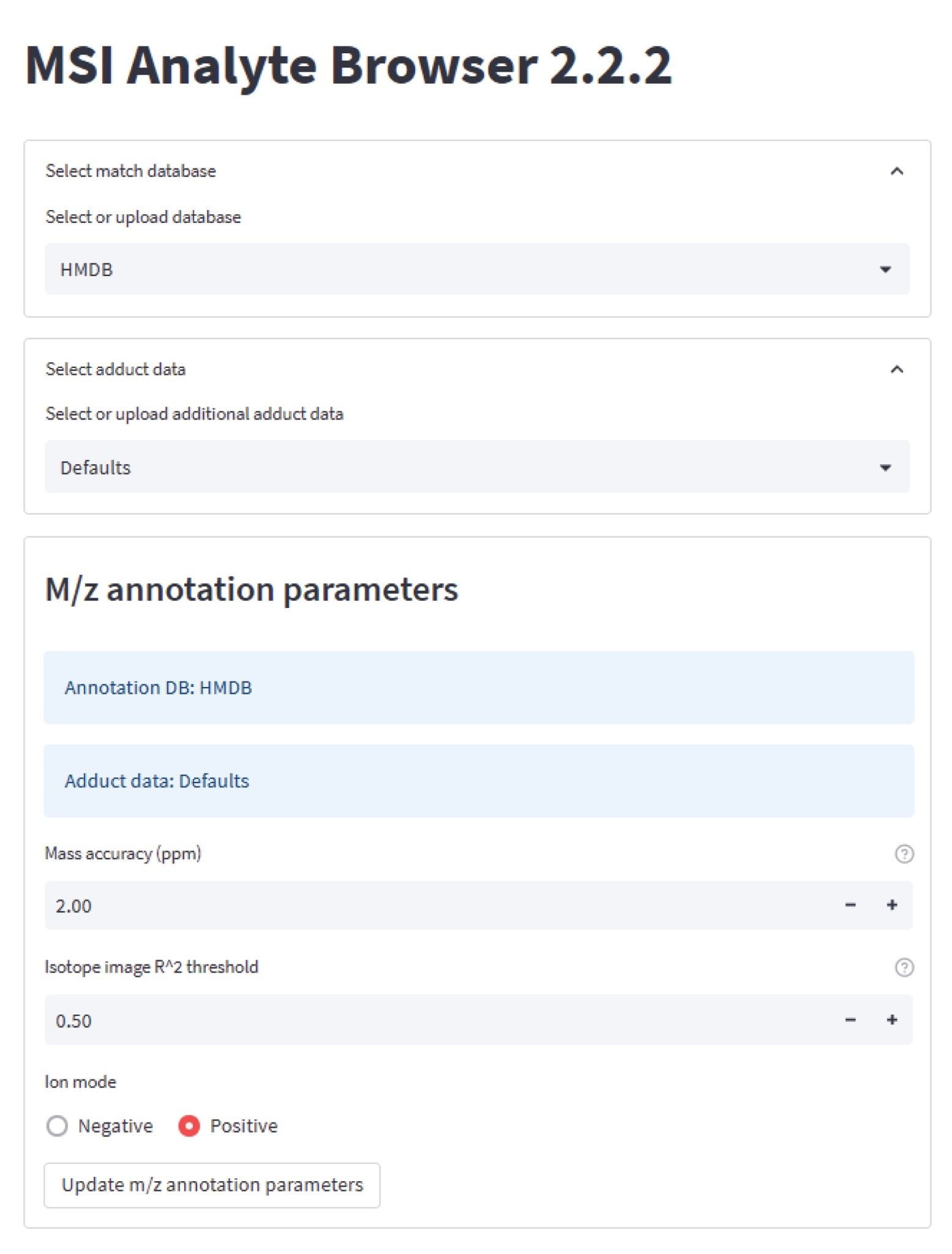
Data were processed through HDI Software taking the top 1000 features of the whole image. The processed analyte file was imported into MSI Analyte Browser MicroApp and processed using a publicly available hmdb database (hmdb.ca).1 Database matches were performed using the following default adducts: [M+H+], [M+Na+], and [M+K+] for positive mode dataset, and [M+H-], and [M+Cl-] for negative mode dataset (user set adducts can be used if preferred). Tolerances were set to a 2 ppm mass accuracy and a 0.5 isotope image R2 threshold (Figure 1).
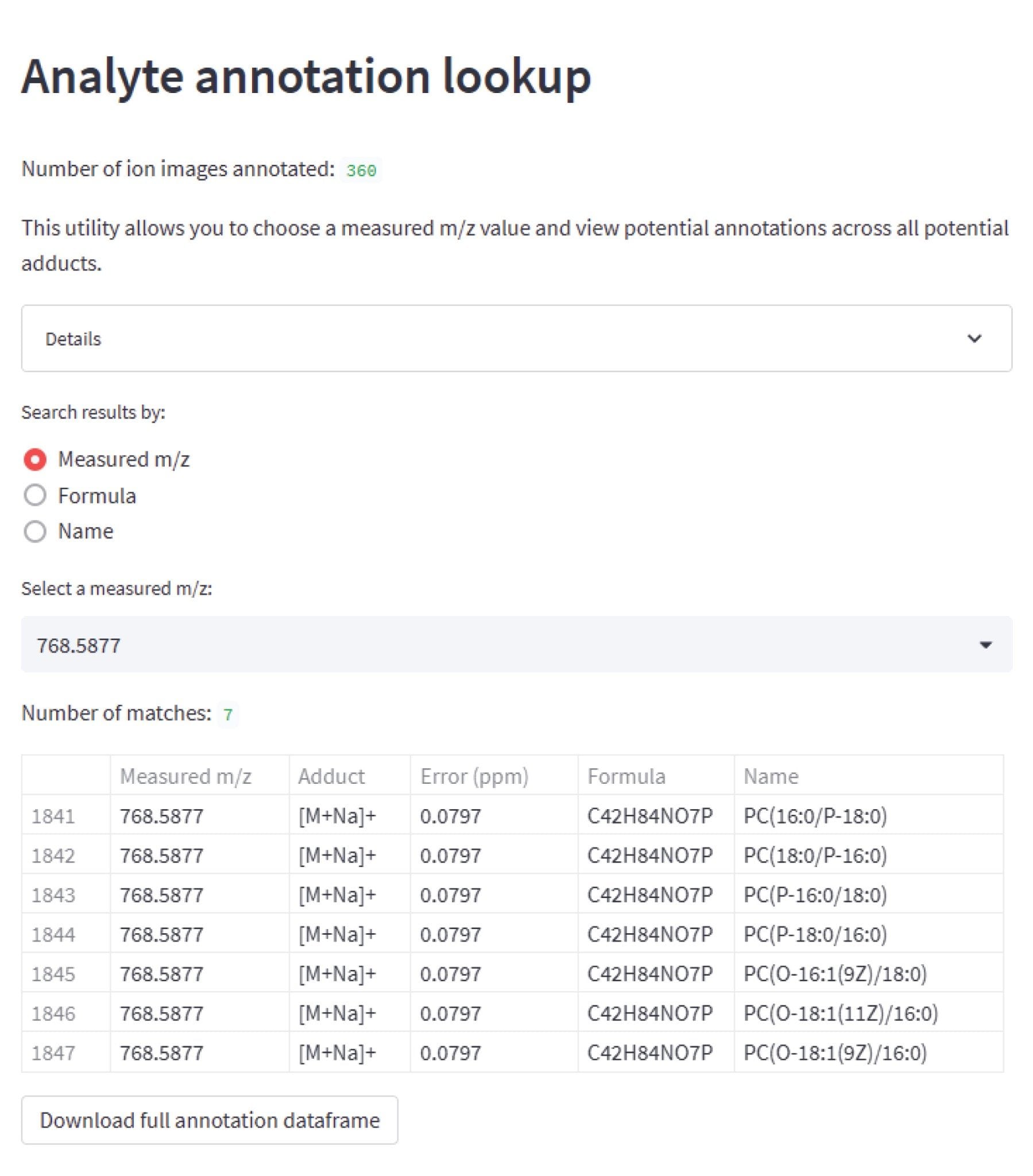
Once the analyte file is matched against the database, it is possible to manually look up either specific masses, formula, or compound names for the dataset. Figure 2 shows an example view searching for a specific analyte mass (m/z 768.5877) and the software displaying putative identifications for this analyte, which are a number of sodiated PC isomers.
If preferred, the results can be exported for study outside of the software or to ensure a stored version of the results is retained. If data is exported from the “analyte annotation lookup” tab, the exported .csv will provide the user with every potential putative match made for each analyte, along with the mass accuracy, formula, and name for each match. This list will not include any analytes where no matches were found. Should a user prefer, results can be downloaded from the “closest match” tab. This lists every analyte surveyed, how many matches were found, and provides the formula and name of the closest match in terms of m/z. The view will show every analyte in the dataset; however, only the identification with the best mass accuracy is provided. For isotopes, the result will be the first isotope alphabetically. The list can also be imported into HDI Software to annotate the peaks in the peak list.
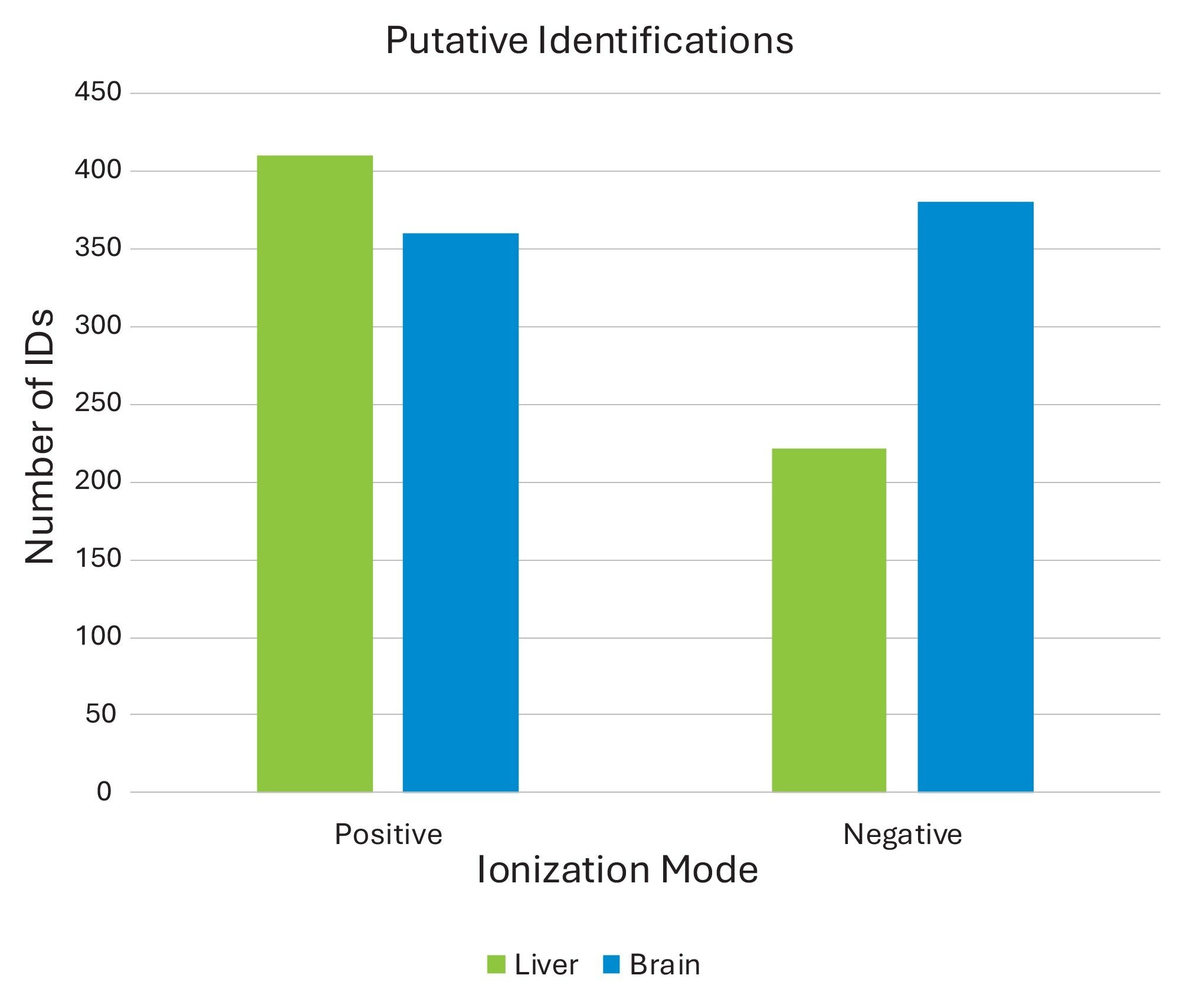
From a closest match result download, using these four datasets, the following putative identifications were obtained: 410 analytes from the positive mode ionization of porcine liver, 222 analytes from the negative mode ionization of porcine liver, 360 analytes from the positive mode ionization of rodent brain, and 380 analytes from the negative mode ionization of rodent brain (Figure 3).
This application brief demonstrates that MS imaging data can now be easily and rapidly searched through a database for putative identifications using the MSI Analyte Browser MicroApp. That data can be processed using HDI Software in a number of different ways and then imported into the tool, depending upon user requirements. The MSI Analyte Browser MicroApp can be utilized with publicly available databases or individually curated databases built by the user and supports a number of different database file formats. Once data is processed, results can be viewed within the software or exported as a csv file for review or storage. This software simplifies and speeds up database searching for imaging applications compared to historic workflows.
720009322, May 2026


